Helb loan subsequent application guide for continuing students
The Higher Education Loans Board, Helb, has opened the 2024/2025 Undergraduate Subsequent Scholarship and Loan application. Apply now using USSD code *642# or the HELB App. Read the post below for more information.
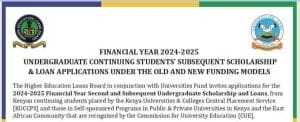
The Higher Education Loans Board in conjunction with Universities Fund invites applications for the 2024-2025 Financial Year Second and Subsequent Undergraduate Scholarship and Loans, from Kenyan continuing students placed by the Kenya Universities & Colleges Central Placement Service [KUCCPS] and those in Self-sponsored Programs in Public & Private Universities in Kenya and the East African Community that are recognized by the Commission for University Education [CUE].
Bligible students: Undergraduate Continuing Students applying for the second and subsequent student scholarship and loan.
Continue reading:
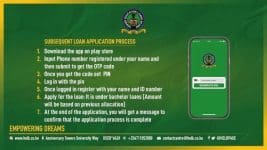
1. Download the HELB App from Google Play Store or use USSD Code by dialing *642#
2. Register using your phone number to generate a PIN which you will use to log in.
NB: Ensure the mobile number is registered under your name. Please NOTE that mobile numbers not registered in the student’s name will not be able to proceed with the application.
3. Read, understand, and click to accept the terms and conditions.
4 Enter your (first name) as it appears on your national ID card, the 1D number and valid email address to complete registration.
5. Click on the scholarship or loans or loans & scholarship tab and choose degree. Then click “apply” on the Undergraduate second and subsequent scholarship and loan.
6. Read and understand the process tutorial and proceed to read the financial literacy guide.
7. Answer the financial literacy questions and scroll down to view results and click “proceed”.
8. Click on get started to start the application process.
9. Enter your phone number which should be registered in your name and national [D number to verify that you are the owner.
10. Read and understand the scholarship/loan terms and condition and agree to proceed.
11. Click request loan to view and verify your loan details.
12. Select your preferred loan payment option.
13. Click “submit” to complete the loan application. A pop-up message will appear to show that you have successfully applied. The loan serial number will also be displayed.
14. Indue course, you will receive other notifications on awards and disbursements of upkeep and tuition loans and where applicable, bursary.
15. Contact HELB for any further assistance.
Please note:
This application is paperless. You are not required to print any form. A confirmation SMS with a loan application serial number is the evidence that you have applied. Kindly save the SMS for future reference. HELB does not charge any fee to access the loan application.
The dosing date for the applications is 31st of December 2024.
Get the latest Mwalimu National Sacco BOSA Loans Application Form {Free Download}, here. PDF Latest…
Here is the revised and latest Mwalimu National Sacco FOSA Salary Advance Application Form {Free…
Here is the latest Mwalimu National Sacco FOSA Instant Loan Application Form {Free Download}. Download…
The landscape of digital gambling has shifted toward high-octane mechanics that prioritize volatility and massive…
The Teachers Service Commission (TSC) has advertised 170 job vacancies across, covering senior, mid‑level, and…
Health Cabinet Secretary Aden Duale has ordered immediate changes to the Social Health Authority (SHA)…