Are you looking for a procedure on how to apply for the advertised TSC internship and PnP vacancies online at the https://hrmis.tsc.go.ke/ portal? Well, here is your step by step guide on how to easily apply for the TSC vacancies online. Remember, TSC does not accept manual applications.
The procedures for filing primary and secondary school applications are slightly different. Therefore, ensure that you follow the right procedure in filing your application online.
If you are seeking to apply for the primary schools advertised vacancies then, follow the steps below;
1. Visit the TSC online recruitment portal by using the link; https://hrmis.tsc.go.ke/app/login. Click Career then Teachers/Secretariat then CLICK apply for teachers Recruitment/Internship. The screen below will be displayed.
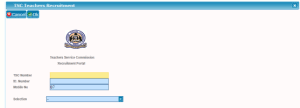
2. Type in the TSC No, ID number and mobile and choose your selection either
primary or secondary by clicking the drop down menu as shown below and click ok
(i) This screen below shows the selection for primary
3. The sms code from TSC Kenya will be send to the applicant mobile phone
and the screen below will appear
4. Type in the sms code as shown below and click ok
5. The screen below will be displayed. Click on Apply/view as shown below
6. The screen below will be displayed where the applicant will fill in the details
7. Choose the Ref from the drop-down as shown and fill the other details not
auto filled and click ‘ok’.
8. The screen below will be displayed. Click yes as shown
9. The screens below will be displayed showing the list of applications done by
applicants.
NOTE: The teacher can make several application in different counties/sub counties
(i) This is one application
(ii) List of several application for different counties
For those applying for posts in secondary schools, they will have to follow the procedure below;
1. Click Career then Teachers/Secretariat then CLICK apply for teachers Recruitment/Internship. The screen below will be displayed.
2. Type in the TSC No, ID number and mobile and choose your selection i.e Secondary by clicking the drop down menu as shown below and click ok
3. The sms code from TSC Kenya will be send to the applicant mobile phone and the screen below will appear
4. Type in the sms code as shown below and click ok as shown
5. The screen below will be displayed for secondary teacher. Click on Apply/view as shown below
6. The screen below will be displayed where the applicant will fill in the details
7. Choose the Ref from the dropdown as shown and fill the other details not auto filled and click ok as shown below. Click the button +click here to apply a school as shown;
8. On clicking +click here to apply a school the screen below is displayed
9. Choose the subjects, county, sub county and school and click ok as shown below;
10. The screen below is displayed showing the date, county, sub county, school and stage of the application;
11.The teacher can apply for several vacancies as shown below. CLICK OK;
12.The screen below is displayed then CLICK yes as shown
13.The screen below is displayed and the application is completed
Wishing you success in this year’s recruitment.
Get the latest Mwalimu National Sacco BOSA Loans Application Form {Free Download}, here. PDF Latest…
Here is the revised and latest Mwalimu National Sacco FOSA Salary Advance Application Form {Free…
Here is the latest Mwalimu National Sacco FOSA Instant Loan Application Form {Free Download}. Download…
The landscape of digital gambling has shifted toward high-octane mechanics that prioritize volatility and massive…
The Teachers Service Commission (TSC) has advertised 170 job vacancies across, covering senior, mid‑level, and…
Health Cabinet Secretary Aden Duale has ordered immediate changes to the Social Health Authority (SHA)…



