The Kenya National Examinations Council (Knec) has opened the portal for registration of the 2021 Kenya Certificate of Primary Education (KCPE) examinations. The portal will remain open between 2nd June, 2021 and 31st July, 2021. Since there will be no late registration, please mark the registration dates to avoid the last minute rush.
How to register candidates for the KCPE examinations online
To register candidates for KCPE examinations follow the following easy steps;
- Visit the official KCPE KNEC registration portal by using the address; https://www.knec-portal.ac.ke/kcpe.
- Log into the system by entering your user name (school Knec code) and password. Then, click on ‘Login’.
- Once logged in, check the ‘Register Candidates’ menu and click on ‘Select’.
- Choose ‘Enter New Candidates’ and click on ‘continue’.
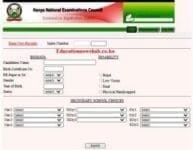
- Next to the ‘Enter New Records’ tab, insert the last three digits of the candidate’s Index Number.
- Correctly fill the following BIODATA for the candidate:
- Candidates Name,
- Birth Certificate No.,
- RE Paper to Sit (Choose between CRE, IRE and HRE),
- Gender (Choose Male or Female),
- Year of Birth,
- Status (Choose between Citizen and Non Citizen) and
- Disability; if there is any.
- Select the ‘Secondary Choices’ as per the candidate’s preference. These should include: Four national schools, three Extra County Schools, two County and Sub County schools, each.
- Finally, Click on ‘Submit’ to capture the learner’s registration details.
You may also like;
Knec circular on Registration for 2021 KCSE, KCPE and KCSE Qualifying Test Examinations
KNEC portal for school exams https://www.knec-portal.ac.ke/ (Register and download candidates’ KCSE, KCPE Exams)
The KCPE Knec Portal login and candidates registration at https://www.knec-portal.ac.ke/kcpe
Knec Login; Complete Guide for Knec Portals Login
Knec KCSE Registration Portal at https://www.knec-portal.ac.ke/kcse/registration
The Knec CBA portal login, capture learner scores, download CBA tools and results at https://cba.knec.ac.ke/
Official Knec Contacts; Phone numbers, Email, Telephone, Facebook, Portals, Website
KNEC LCBE portal 2021/2022; How to enter learners’ scores
Editing registration details for an existing KCPE candidate.
You can easily make correction to records of already registered candidates. To achieve this, follow these steps:
- Visit the official KCPE KNEC registration portal by using the address; https://www.knec-portal.ac.ke/kcpe.
- Log into the system by entering your user name (school Knec code) and password. Then, click on ‘Login’.
- Once logged in, check the ‘Register Candidates’ menu and click on ‘Select’.
- Choose ‘Edit existing candidate (s)’ and click on ‘continue’.
- Next to the ‘Edit Existing Records’ tab, enter the candidate’s index number (last three digits) and click on ‘Find’. The candidate’s details will be displayed.
- Make corrections to the student’s details and click on ‘Submit’.
Deregistering a KCPE candidate
You can equally delete the registration details for an already registered candidate. Follow these steps;
- Visit the official KCPE KNEC registration portal by using the address; https://www.knec-portal.ac.ke/kcpe.
- Log into the system by entering your user name (school Knec code) and password. Then, click on ‘Login’.
- Once logged in, check the ‘Register Candidates’ menu and click on ‘Select’.
- Choose ‘Edit existing candidate (s)’ and click on ‘continue’.
- Next to the ‘Edit Existing Records’ tab, enter the candidate’s index number (last three digits) and click on ‘Find’. The candidate’s details will be displayed.
- Scroll to the bottom of your screen and click on the ‘delete’ tab.
- The portal will prompt you to confirm the action since it is irreversible. You will see this question; ‘Are you sure you want delete this?’ Click on ‘Ok’ to complete the process.
DOWNLOADING THE KCPE NOMINAL ROLLS.
Once you have completed capturing details for all candidates, you will be required to print the Nominal rolls that will be sent to Knec. To download and print the nominal rolls follow the guide below;
- Visit the official KCSE registration portal by using the address; https://www.knec-portal.ac.ke/.
- Log into the portal by enter the user name (school Knec code) and password. Then, click on ‘Login’.
- Once logged in, you will see the ‘CONFIRM REGISTRATION‘ menu. Next to ‘task’, select the desired report (Master or Subject nominal roll). Then, click on ‘continue’.
- Give the system some few minutes to fully load the Nominal roll.
- Click on the ‘export’ button, select the format that you want to use and the nominal roll will be automatically downloaded.
- Locate the nominal roll in your downloads, open and print it.
- Accordingly sign the printed nominal roll (s).
By Editorial TeamThe Education News Hub Editorial Team is made up of vibrant and experienced editors. Brian Yano is an accomplished longtime Digital Media Journalist at Educationnewshub.co.ke with a great passion for research and fact-checking. He delivers engaging content across diverse topics, with a special interest in Education matters. On her part, Yvonne Kemunto is a journalist, dedicated to unraveling stories that matter. With a keen eye for detail and a passion for storytelling, she brings a fresh perspective to the world of media. Her commitment to detail and excellence shines through in every piece she crafts. Our newest member of the Editorial Team is Jennifer Mumbo. She is a Seasoned Multimedia Journalist with several years' experience; dating back to 2018. Jennifer has a passion for education, sports, tech, politics and entertainment. You can reach the editors at educationnewshub3@gmail.com.