Categories: KNEC News

KNEC LCBE portal; How to enter learners’ scores

You can now easily capture the Kenya National Examinations Council, KCSE, grade 4 scores on the LCBE portal; lcbe.knec.ac.ke. After administering and marking the KNEC Grade 4 tests, you will be expected to upload the scores for each leaner.

HOW TO ENTER MARKS ON THE LCBE PORTAL

  • First, you need to log onto the LCBE portal by following the link; https://lcbe.knec.ac.ke/
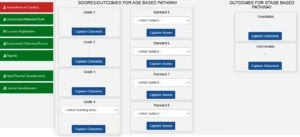
  • Once logged in, select ‘Assessment outcomes/Scores’. A new Window ‘SCORES/OUTCOMES FOR AGE BASED PATHWAY’ will be displayed.
  • Go to the part marked ‘Grade 4’ and under it click ‘select learning area’. Please note that scores for each learning area will be captured separately.
  • Next, choose the learning area for which you want to capture marks.
  • Now you can either use the online or offline scores capture procedure.
  • Use same procedures to upload scores for all other grades and classes.

OFFLINE SCORES CAPTURE

For the offline method;

  • Click ‘Download’ to get the Excel spreadsheet of all the registered learners.
  • Locate the downloaded mark list. Enter the scores for all the questions under the right columns and for all the learners.
  • Save the changes.
  • Go back to the LCBE portal and click ‘Choose File’. Choose the file as saved on your device.
  • Finalize capture of the marks by clicking ‘upload excel document’. If you are uploading an excel sheet for a second time or more, the initial data for Standard 8 will be deleted.
  • Repeat this procedure for all the subjects i.e English, Kiswahili, Mathematics, Science & Technology and Kenya Sign Language. Each of the learning areas is to be uploaded separately.
See also;

ONLINE SCORES CAPTURE

  • Go to the part marked ‘Grade 4’ and under it click ‘select learning area’. Please note that scores for each learning area will be captured separately.
  • Choose the learning area for which you want to capture marks.
  • Under ‘Online Scores Capture’ Click ‘capture scores online’ to get online capture form.
  • Under the column indicated ‘select to key/ edit marks’, click/ tick in the box to activate entry of marks into the questions’ columns.
  • Once the marks have been entered for each learner in the row, click ‘save’ to upload the scores.
  • Repeat the procedure until marks for all learners have been captured.

It is good that you ensure that the scores for each learner have been captured correctly. You can always click on ‘View/Edit Scores’ for each respective subject. This will also enable you to make necessary corrections on the captured scores.

By Editorial Team

The Education News Hub Editorial Team is made up of vibrant and experienced editors. Brian Yano is an accomplished longtime Digital Media Journalist at Educationnewshub.co.ke with a great passion for research and fact-checking. He delivers engaging content across diverse topics, with a special interest in Education matters. On her part, Yvonne Kemunto is a journalist, dedicated to unraveling stories that matter. With a keen eye for detail and a passion for storytelling, she brings a fresh perspective to the world of media. Her commitment to detail and excellence shines through in every piece she crafts. Our newest member of the Editorial Team is Jennifer Mumbo. She is a Seasoned Multimedia Journalist with several years' experience; dating back to 2018. Jennifer has a passion for education, sports, tech, politics and entertainment. You can reach the editors at educationnewshub3@gmail.com.

Recent Posts

Mwalimu National Sacco BOSA Loans Application Form {Free Download}

Get the latest Mwalimu National Sacco BOSA Loans Application Form {Free Download}, here. PDF Latest…

1 hour ago

Mwalimu National Sacco FOSA Salary Advance Application Form {Free Download}

Here is the revised and latest Mwalimu National Sacco FOSA Salary Advance Application Form {Free…

2 hours ago

Mwalimu National Sacco FOSA Instant Loan Application Form {Free Download}

Here is the latest Mwalimu National Sacco FOSA Instant Loan Application Form {Free Download}. Download…

2 hours ago

Best slots with sticky wilds and expanding symbols in 2026

The landscape of digital gambling has shifted toward high-octane mechanics that prioritize volatility and massive…

2 hours ago

Advertised TSC Secretariat Vacancies in 2026 {Requirements and How To Apply}

The Teachers Service Commission (TSC) has advertised 170 job vacancies across, covering senior, mid‑level, and…

2 hours ago

Health CS Duale announces major changes to the Teachers’ SHA Medical Scheme

Health Cabinet Secretary Aden Duale has ordered immediate changes to the Social Health Authority (SHA)…

7 hours ago