TSC Latest News

Simplified wealth declaration guide for you on your mobile phone

Hello colleagues you do not need to pay for anyone to do you the wealth declaration, it is simple. Deadline is approaching 31st December….for those who have not declared.

How to fill the online DIAL(Income, Asset, Liabilities) WEALTH DECLARATION

1. On your browser I.e chrome, type teachersonline.tsc.go.ke

2. Click on declaration of income, assets and liabilities.
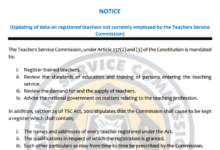
3. Log in by inserting your TSC no and password. You can always reset.

4. Click on wealth declaration

5. Click on biannual declaration and fill your personal details

6. Click next and fill your income(gross pay for two years) assets and liabilities while you save each.

7.Click next and enter dependants details including spouse if any

8.Enter witness’s details, save then SUBMIT
9.You will get sms confirmation from TSC KENYA and PDF copy sent to your email address


By Editorial Team

The Education News Hub Editorial Team is made up of vibrant and experienced editors. Brian Yano is an accomplished longtime Digital Media Journalist at Educationnewshub.co.ke with a great passion for research and fact-checking. He delivers engaging content across diverse topics, with a special interest in Education matters. On her part, Yvonne Kemunto is a journalist, dedicated to unraveling stories that matter. With a keen eye for detail and a passion for storytelling, she brings a fresh perspective to the world of media. Her commitment to detail and excellence shines through in every piece she crafts. Our newest member of the Editorial Team is Jennifer Mumbo. She is a Seasoned Multimedia Journalist with several years' experience; dating back to 2018. Jennifer has a passion for education, sports, tech, politics and entertainment. You can reach the editors at [email protected].
Close

Adblock Detected

Please consider supporting us by disabling your ad blocker