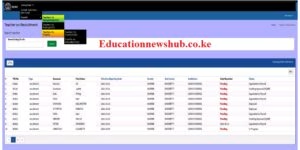
TSC TEACHER POSTING & ENTRY/EXIT USER MANUAL FOR STAFFING OFFICERS
Teacher posting module will enable Teachers Service Commission (TSC) to place teachers in their respective institutions whenever there is either recruitment, transfer or resumption from leave, illness and discipline case.
Once the teacher has been received by Head of Institution (HOI), an Entry/Exit report will then be submitted to the Human Resource Management (HRM) for processing.
Notably, the process of Teacher Posting must be complete in order for Entry/ Exit process to be initiated at the institution level.
Keep reading:
TSC teacher posting, transfers, exit simplified guide (Sub County Directors)
TSC Teachers Online System Simplified Manual (Teacher posting, entry and exit)
TSC; TYPES OF EXITS/ HOW CAN A TEACHER LEAVE/ EXIT SERVICE- TERMINATION BY THE TSC
ACCESSING THE SYSTEM
To access the portal, go to the TSC website https://www.tsc.go.ke.
Click on Teacher Posting & Entry/Exit under Online Services menu.
LOGGING INTO THE SYSTEM
- Key in your TSC number in the textbox provided and click next to proceed.
- Enter your password and click Login button.
LOGGING OUT OF THE SYSTEM
On the far right, click on the drop down arrow, a list will appear click sign out.
MANAGING PASSWORDS
Forgot Password
- On the login page, click on forgot password, Key in your TSC number and click continue.
- A verification code will be sent to your registered mobile number via SMS.
- Enter the verification code and click on continue.
- The sign up page will appear for you to update your profile and create a new password.
- Click next to proceed to the login page.
Changing Password
- Click on My Profile
- Click on Account
- Provide New password and Confirm password.
- Click Save to effect changes
POSTING OF TEACHERS ON RECRUITMENT
This process will be initiated by Staffing Officers at the HQ, Primary teachers will be posted to counties while post primary teachers posted directly to respective institutions.
- Once logged in, a new screen will appear.
- Click on teachers on recruitment Key in the teacher’s TSC number and click on the icon to search.
- On the window that appears with the teacher’s basic details. Select recruitment type appropriately.
- Primary or post-primary institution.
Selecting primary recruitment option will enable posting up to the County Level, while selecting post primary option allows posting directly to the institution level. - Select the required information in all fields and click on Initiate Posting button.
- A message is displayed as shown below to confirm the teacher has been successfully posted.
 TSC Circular on Updating of data on registered teachers not currently employed by the Teachers Service Commission
 Mwalimu National Sacco Loans & Repayment Schedule (BOSA Loans)
 Latest TPAD Teacher’s Checklist of TSC Professional Documents
 Official Kuppet BBF Guidelines For All Branches