Here is the Complete step-by-step guide to applying for your HELB Subsequent Loan using official USSD code *642#. Requirements, registration, and payment setup.
The HELB Subsequent Loan Application for 2026/2027 is officially open for all continuing undergraduate and TVET students. If you are proceeding to your 2nd, 3rd, 4th, 5th, or 6th year of study, submitting your application early is vital to prevent delays in receiving your upkeep and tuition funds.
Because the Higher Education Loans Board (HELB) processes payments on a first-come, first-served basis, late submissions will result in delayed university disbursements. Below is the updated official walkthrough to complete your application quickly via the *642# USSD shortcode.
Mandatory Application Requirements
Before dialing the shortcode, ensure you possess the following two primary requirements:
-
- Registered SIM Card: A Safaricom mobile line legally registered under the student’s name.
-
- Identification: Your original National ID Card (you will need both your ID Number and ID Serial Number).
Step-by-Step HELB USSD Application Process
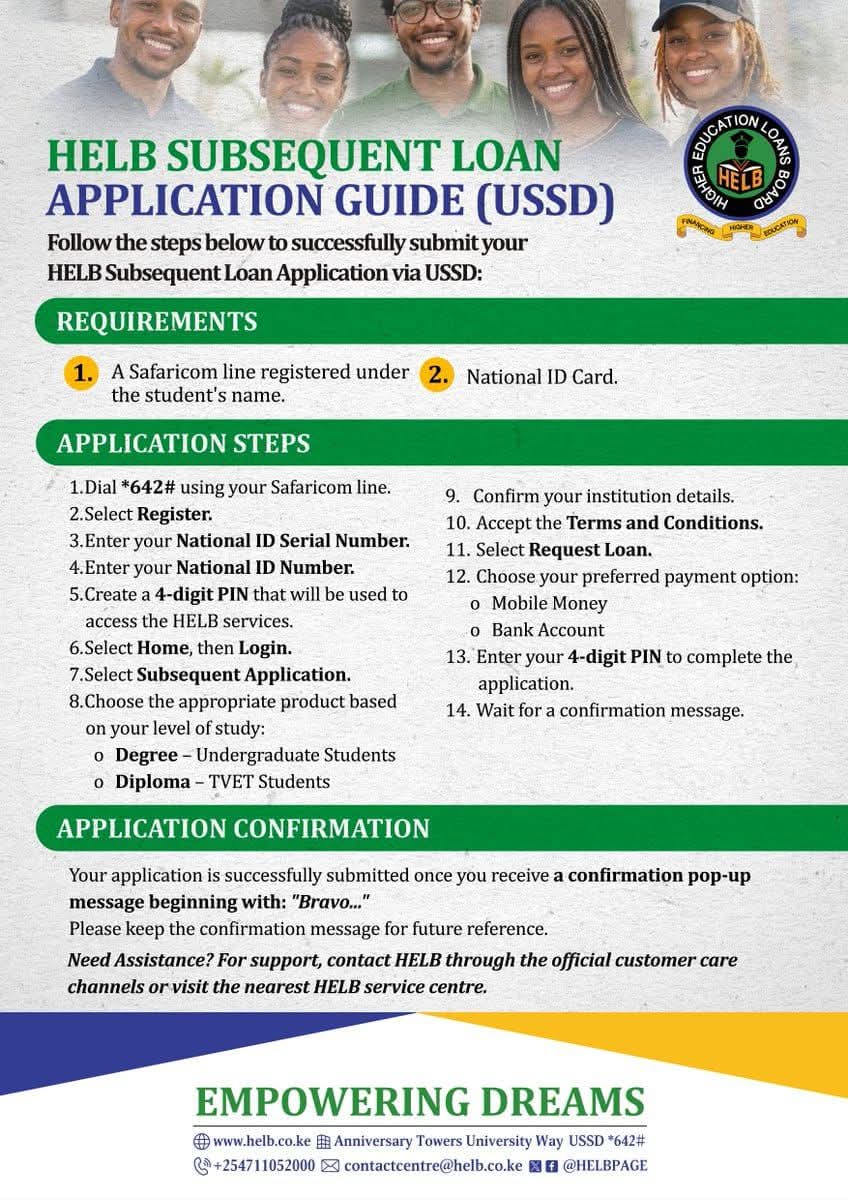
Follow these 14 official steps carefully to register and successfully submit your subsequent loan request:
Part 1: Account Creation & Registration
-
- Step 1: Dial *642# using your registered Safaricom line.
-
- Step 2: Select Register from the menu prompts.
-
- Step 3: Enter your National ID Serial Number (found on your physical ID card).
-
- Step 4: Enter your National ID Number.
-
- Step 5: Create a secure 4-digit PIN that you will use to log into HELB services in the future.
Part 2: Submitting the Loan Request
-
- Step 6: Return to the main menu, select Home, then choose Login.
-
- Step 7: Select the Subsequent Application option.
-
- Step 8: Choose your appropriate product category based on your level of study:
- Degree – Undergraduate Students
- Diploma – TVET Students
- Step 8: Choose your appropriate product category based on your level of study:
-
- Step 9: Confirm your institution and course details.
-
- Step 10: Read and Accept the Terms and Conditions.
-
- Step 11: Select Request Loan.
-
- Step 12: Choose your preferred disbursement payment option:
- Mobile Money (M-Pesa)
- Bank Account
- Step 12: Choose your preferred disbursement payment option:
-
- Step 13: Enter your 4-digit PIN to authenticate and authorize the application.
-
- Step 14: Wait on the line for your final confirmation message.
Successful Application Confirmation
Your application is only considered successfully submitted once a pop-up confirmation message appears on your screen beginning with the word: “Bravo…”

Make sure to take a screenshot or write down the serial details provided in this text for future tracking purposes. You can monitor live disbursement and processing updates at any time by logging directly into your student account on the Higher Education Financing (HEF) Portal.
Troubleshooting, Error Handling & Official Support
Resetting Forgotten Passwords via *334#
If your account PIN locks you out, you can reset it through the primary government services directory:
-
- Dial *334# on your phone.
-
- Navigate to Option 6 (Lipa na M-Pesa) > Option 46 (Government Services) > Option 2 (HELB).
-
- Select the Forgot Password path and follow the prompts using your ID and Year of Birth.
Minor Students Without National IDs
If you originally applied using a KCSE Index number because you were a minor, download the official HELB Mobile App from the Google Play Store. You can register on the app using your KCSE Index Number and Birth Certificate Number.
Once you receive your physical ID card, log into the HEF Student Portal to update your account records before making subsequent requests.
Official HELB Customer Care
If you encounter network timeouts, heavy server traffic bugs, or persistent registration errors, visit your nearest Huduma Centre HELB Service Desk or use these verified contact lines:
-
- Official Support Line: +254711052000
-
- WhatsApp / Direct Assistance Support: 0719409135
-
- Official Email Address: [email protected]
-
- Physical Headquarters: Anniversary Towers, University Way, Nairobi.
(Note: There is currently no active appeals process window open for continuing students. Double-check all entered serial and institution details before typing your final authorization PIN).
Frequently Asked Questions (FAQs)
To help you navigate the HELB subsequent loan application 2026/2027 portal seamlessly, we have compiled quick answers to the most common queries from university and TVET comrades:
Q1: What is the official USSD code for the HELB Subsequent Loan Application?
The official shortcode for subsequent applications is *642#. Do not use unverified third-party numbers. For password and account PIN resets, you can access the main government services sub-directory via *334#.Q2: How do I know if my HELB application went through successfully?
Your mobile session will display a dynamic confirmation pop-up window starting with the text “Bravo…”. You will also receive an SMS containing your unique application serial number. Make sure to log into the Higher Education Financing (HEF) Portal to track live funding milestones.Q3: Can I apply for subsequent funding if my previous year’s disbursement is delayed?
Yes, absolutely. Even if your upkeep or tuition allocation from the last semester is still marked as pending, you must apply for the current academic cycle immediately. Missing the window completely locks you out of the next automatic payment allocation loop.Q4: Why does dialing *642# throw a connection error or network timeout?
High traffic density from thousands of students causes occasional server timeouts. If you experience errors, avoid applying during regular daytime peak hours. Instead, dial the shortcode late at night or early in the morning, or complete your profile via the official HELB Mobile App.