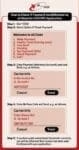
Checking Kuccps payment processing status
Wondering whether your payment for Kuccps placement has reflected on the eCitizen platform? Worry no more.
It is now easy for you to check the eCitizen payment processing status by using the mobile code 222.
Here is how to easily check:
1. Dial *222# on your mobile phone
2. Select Option 6 (Check Payment)
3. Enter Invoice No. (eCitizen Payment Account) and Send
4. Enter M-Pesa transaction code and Send
KUCCPS Student portal login student.kuccps.net for Admission Application
How to check kuccps degree and diploma placement
Kuccps admission lists and letters pdf for all universities (How to download Kuccps letter)
Kuccps Diploma Programmes (Course codes, requirements and institutions)
Kuccps cut off points for all courses
KUCCPS opens portal for first application, revision of courses for KCSE candidates
Kuccps opens student portal for University and College placement applications/ revision of courses
KUCCPS latest placement news for KCSE candidates-
Get the latest Mwalimu National Sacco BOSA Loans Application Form {Free Download}, here. PDF Latest…
Here is the revised and latest Mwalimu National Sacco FOSA Salary Advance Application Form {Free…
Here is the latest Mwalimu National Sacco FOSA Instant Loan Application Form {Free Download}. Download…
The landscape of digital gambling has shifted toward high-octane mechanics that prioritize volatility and massive…
The Teachers Service Commission (TSC) has advertised 170 job vacancies across, covering senior, mid‑level, and…
Health Cabinet Secretary Aden Duale has ordered immediate changes to the Social Health Authority (SHA)…

