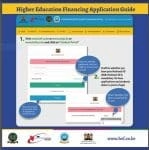
The USSD Code *642# is a convenient and secure way to access funds from the HELB-MPESA Wallet.
Follow these easy steps to make your withdrawal.
Step 1: Dial *642# from your registered Mpesa line.
Step 2: Register and choose a PIN that you can be able to remember.

Step 3: Dial *642# again to login and select withdraw funds.
Step 4: Choose upkeep option and indicate the amount you want to withdraw.
Step 5: Enter your Mpesa PIN Number to complete the transaction.
Step 6: A confirmation message from Mpesa will be sent to you.
Please note that Ksh15 will be charged per transaction made.
About The Author
Educationnewshub.co.ke
The Education News Hub Editorial Team is made up of vibrant and experienced editors. Brian Yano is an accomplished longtime Digital Media Journalist at Educationnewshub.co.ke with a great passion for research and fact-checking. He delivers engaging content across diverse topics, with a special interest in Education matters.
On her part, Yvonne Kemunto is a journalist, dedicated to unraveling stories that matter. With a keen eye for detail and a passion for storytelling, she brings a fresh perspective to the world of media. Her commitment to detail and excellence shines through in every piece she crafts.
Our newest member of the Editorial Team is Jennifer Mumbo. She is a Seasoned Multimedia Journalist with several years' experience; dating back to 2018. Jennifer has a passion for education, sports, tech, politics and entertainment.
You can reach the editors at [email protected].