University, College and Tvet students can now withdraw Higher Education Loans Board (HELB) loans via M-Pesa. Helb has announced.
The Higher Education students’ funding body unveiled the HELB M-Pesa wallet for students’ ease of access to the disbursed loan funds.
This is a big boost to the Students as they can now access their helb funds without visiting banking halls and ATMs; as has been the case in the past. HELB used to disburse funds to students via commercial bank accounts, sometimes taking longer to reflect and difficult to withdraw.
_______________________________________________________________________


Continue reading below;
_______________________________________________________________________
Simplified steps on how to register for HELB M-Pesa wallet
Helb has provided the easy steps to be followed by students who are beneficiaries of the loans to register for the service. The Board delivered the good news to students via a presser.
“Are you a first-time or subsequent loanee and wondering how to access your MPESA Wallet? Tumekusort on this end. Access your HELB-Mpesa wallet via Mpesa App…” reads the board presser; in part.
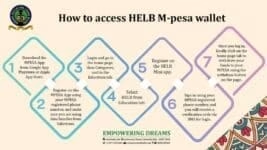
How to access HELB M-pesa wallet
- Download the MPESA App from Google App Playstore or Apple App Store.
- Register on the MPESA App using your MPESA registered phone number, and make sure you are using data bundles from Safaricom.
- Login and go to the home page, then Categories, and to the Education tab.
- Select HELB from Education tab.
- Register on the HELB Mini app.
- Sign in using your MPESA registered phone number, and you will receive a verification code via SMS for login.
- Once you log in, kindly click on the home page tab to withdraw your funds to your MPESA using the withdraw button on the page.
Helb contacts
- www.helb.co.ke
- Anniversary Towers University Way
- USSD *642#
- +254711052000
- [email protected]
- Twitter: @HELBPAGE