It is now very easy for you to check the Higher Education Loans Board, Helb, loan disbursement status online. Monitor the disbursed Helb loan batches online, today.
How to check HELB disbursement status online
Although many students find it difficult to check their loan disbursement status, the process is very simple. To check for your HELB loan disbursement follow these steps:
- Visit HELB website www.helb.co.ke
- Click on loan status. You will be directed to your HELB portal (You must have registered with HELB)
- Click on disbursement a form indicating your loan disbursement status will appear
- Click on disbursement and a form indicating your loan disbursement status will appear.
You can also check your loan disbursement status through your bank account that you used during first time registration.
Students with HELB smart card can use it to check their loan disbursement status. Remember that the smart card has three parts, tuition, upkeep and general use. Amount in the tuition part cannot be withdrawn.


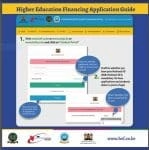
HELB loan disbursement status, repayment and Registration using SMS services/Mobile phone
A student can also access HELB loan services using Short message services, SMS. The following services can be obtained through SMS code:
- Loan Application and Disbursement status.
- Loan repayment status.
- Loan balance.
- Loan mini-statement
- HELB Compliance and Clearance Certificate Checker.
- Loan repayment and many more.
HOW TO REGISTER FOR HELB LOAN MOBILE SERVICES.
- Go to your dialer on your mobile and enter *642# and send.
- Then Select/ enter 1 and send.
- On the next window prompts, provide your: First name, last name, National ID number, date of birth.
- Enter a PIN you can easily remember and confirm it.
- A registration success message will be displayed thus: “Thank you for registering with the HELB mobile platform. You will receive SMS Confirmation Shortly.”
HOW TO CHECK FOR HELB LOAN APPLICATION AND DISBURSEMENT STATUS.
- Enter *642# into your dialer.
- Select option 1 for log in.
- Enter your PIN.
- Select 1 for Loan application and Disbursement.
- For Disbursement report select option 1 and select the academic year. Your loan disbursement report will be sent to your line via SMS.
HOW TO CHECK HELB LOAN REPAYMENT STATUS USING MOBILE PHONE
- Dial *642# and send.
- Select option 1 to log in.
- Enter your PIN.
- Select Option 2 for Loan Repayment.
- The following Loan Repayment interfaces are displayed.
- Loan status
- Loan balance
- Loan Mini-statement
- Repay loan
- Request information.