Did you secure your chance to study at a university or college to study a course of your choice? The Higher Education Loans Board (Helb) advances loans to all students in public and private universities and Colleges.
Remember,you can easily apply and track helb loans by using their official website, mobile App and Mobile USSD code.
THE HELB MOBILE APP.
The Higher Education Loans Board, HELB, has developed a mobile app that makes it easier for you to apply for students’ loans and scholarships. The mobile HELB mobile application that is available freely on Google Play enables you to apply for various loans including the second and subsequent undergraduate loans. And yes, the new app makes the HELB loan application process purely paperless i.e no physical copies are required during the whole application process.
Wondering how to install and use the new app? Worry not. We will take you on a step by step simplified process on how to successfully apply for your loan using your mobile phone.


DOWNLOADING, INSTALLING AND USING THE NEW APP.
The HELB mobile app is one the best and user friendly apps. All that you need is a smart phone with play store and a few bundles. Then, follow the steps here, below:
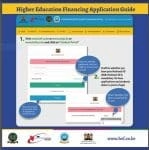
- The first step is to install the app on your mobile phone. Open play store on your mobile phone (you can even use a friend’s mobile phone in case you do not own one). Then type ‘HELB’ and click ‘install’. (You can download the HELB mobile app available on GooglePlay and have fast and convenient access to all HELB services. Click on this link to get started
- Once successfully installed, you will be prompted to enter your phone number (Safaricom line only and must be registered under your name). Do this, followed by clicking ‘Generate PIN’.
- A verification code will be automatically sent to your mobile phone and also email address that is registered on the HELB portal. (In an event you do not receive the code within few minutes, click ‘Resend verification code’.
- Enter the verification code received and set your log on, PIN. Now, click ‘set PIN’.
- On the next window, enter your PIN (THE ONE YOU HAVE JUST SET), read the licence agreement and click ‘Accept’ to proceed.
- Complete yor registration in the next window by filling out the mandatory fields; First name, ID Number and Email address. ‘Select Register/ Proceed’.
USING YOUR ACCOUNT DASHBOARD.
Now, you will automatically be redirected to your personal account dashboard. The account dashboard contains the following menu:
- Loans menu: Used to apply for certificate, diploma, undergraduate and post graduate loans and showing your loan status.
- Scholarships menu: For accessing undergraduate and postgraduate scholarships.
- Repayment menu: Used to check your loan balance and make repayments.
- Clearance menu.
- Account settings and contact us menu.
SEE ALSO;
Guide to the HELB Mobile Short code used for loan repayment, application and Disbursement status
SUBSEQUENT STUDENTS’ UNDERGRADUATE LOANS
Seeking to apply for your second and subsequent loan? This loan is only available to students who have already applied for and/ or received a loan (s) from HELB (within the last three years). Read further guidelines vconcerning this loan here; HELB undergraduate students’ second and subsequent loans- You can now apply, requirements.
To proceed and make your application;
- Click ‘Loans’ from your HELB mobile app account dashboard, followed by ‘Undergraduate Loans’.
- Next, you will select ‘Undergraduate Second Subsequent Loan’, and click ‘Apply’.
- Update your personal, institution and employment details if required to.
- Proceed to filling out the form. Click ‘Ok’ to submit your form.
- Good luck.
Remember you can seek assistance from HELB by using mobile number; 0711052000 or via email; [email protected]