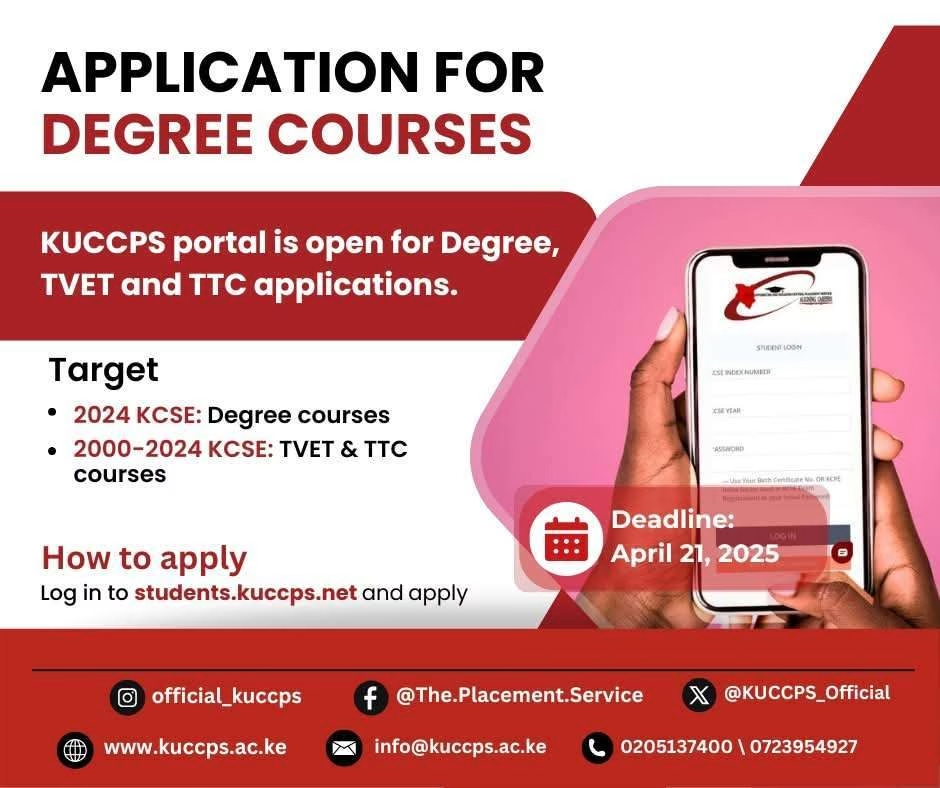
The Kenya Universities and Colleges Central Placement Service (KUCCPS) has officially opened its portal for 2024 Kenya Certificate of Secondary Education (KCSE) candidates to apply for degree courses.
In addition to degree courses, KUCCPS has also invited candidates who sat for their KCSE exams between 2000 and 2024 to apply for Technical and Vocational Education and Training (TVET) programmes and Teacher Training College (TTC) courses.
Qualified students can now access their preferred programmes in universities and colleges across the country by clicking on the link https://students.kuccps.net/
The deadline for applications is April 21, 2025. Candidates are advised to apply early to avoid last-minute inconveniences.




Click here for a quick login: Kuccps Student Portal.
The Kenya University and College Central Placement Service (KUCCPS) is responsible for the admission of KCSE students to universities and colleges in Kenya. KUCCPS has an online student portal (https://students.kuccps.net/)
More news on KUCCPS:
KUCCPS latest news (All the official Kuccps answers to any of your queries)
kuccps placement Cycle (How to get results and admission letters)
KUCCPS website, portals and online services: courses and placements complete guide
Kuccps diploma courses and their codes & colleges
Student Login – KUCCPS | The Placement Service
KUCCPS Application Deadline, Procedure
Kuccps list of all courses application
Kuccps Admission Letters Download
Kuccps latest news today (Answers to frequently asked questions and answers)
KUCCPS opens portal for first application, revision of courses for KCSE candidates
KCSE candidates: How to apply for courses via the KUCCPS portal
Kuccps cut off points for all courses
Kuccps releases placement results
Kuccps placement results out (How to check Kuccps placement results)
Download Kuccps admission letters here
How to apply for Kuccps placement (Simplified guide)
How to check KUCCPS placement results and admission letters for KCSE candidates, all applicants
kuccps application for Diploma and Certificate Courses, online: KUCCPS Latest News
KUCCPS Admission letters for all universities and colleges
Kuccps opens applications for placement of KCSE students; How to apply and requirements
KUCCPS placement and admission letters for students: Agency gives warning
KUCCPS opens portal for first revision by KCSE Candidates, cutoff points retained
How to check Kuccps placement for KCSE candidates (Simplified procedure)
Applications for TTC placement; Diploma teachers training colleges admissions
How to check KUCCPS placement results and admission letters for 2024 KCSE candidates, all applicants
KUCCPS course application/ revision at the Kuccps student portal (step by step simplified guide)
KUCCPS Inter-Institutional Transfers for now open; Simplified procedure
Kuccps portal login (Login to select courses, check placement results and apply for transfer)
How to check kuccps degree and diploma placement
The Kuccps student portal login
How to make TTC online application through kuccps; for placement
KUCCPS website, portals and online services: courses and placements complete guide
KUCCPS admission letters and lists for all universities
Kuccps student portal login and course selection at https://students.kuccps.net/login/
How to apply online for the Placement to Universities and Colleges through KUCCPS
Kuccps Student Portal ( Student Login – KUCCPS | The Placement Service)
Kuccps admission lists and letters pdf for all universities (How to download Kuccps letter)
Kuccps diploma courses and their codes & colleges
Kuccps opens portal for placement of KCSE students to universities and colleges
Kuccps cutoff and cluster points per course
Kuccps Diploma Courses Full List- Requirements, Cut-off points and Colleges
KUCCPS student login portal (https://students.kuccps.net/) and user guide
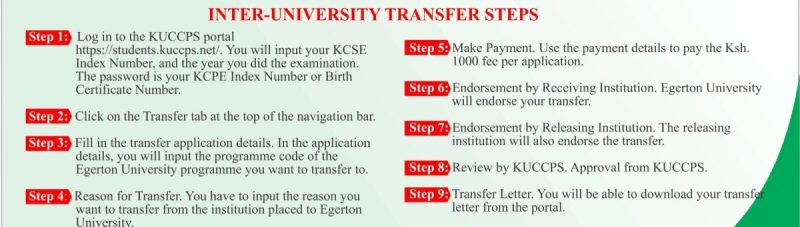
THE KUCCPS STUDENT PORTAL
The Kuccps student online portal (https://students.kuccps.net/) enables them to perform the following activities:
- Application for Kuccps admission to university or College and Course (Programme) of Choice,
- Checking admission status,
- Downloading student application guide,
- Downloading admission letters,
- Checking courses offered at the institutions and
- Applying for inter-institution transfers.
KUCCPS Application Guidelines 2025
- To apply, login to the Student’s Portal using your KCSE Index Number and KCSE Year. Use your Birth Certificate Number/KCPE Index Number as the Password.
- All programmes have minimum subject requirements. You will only be able to apply for a course whose minimum requirements you meet, but the selection will be determined by the overall performance and the available capacity.
- You may view the available programmes and their requirements by clicking the Programmes tab in the portal. You can also search for courses by institution, using the Institutions tab.
- As you select the programmes, you may move the ones that interest you into the Course Basket. This will enable you to work with a shorter list when preparing your final list of courses to apply for.
- Once you have settled on your preferred courses, you will only be required to enter the Programme Codes.
- To apply, use the Application/Revision tab to enter the Programme Codes.
- After confirming that the Programme Codes entered are for the courses you would like to apply for, please submit and follow the application fee payment instructions.
- An application processing fee is charged as follows:
- Students applying for the first time – Ksh 1,500
- Students revising their choices submitted in school – Ksh1,000
- The placement processing fee should be paid after you have selected courses.
- You are advised to keep your transaction code safely. It will be required before you make any subsequent changes to your application.
See also; Kuccps 2025 applications for placement of 2024 KCSE students; How to apply and requirements
How to Pay for KUCCPS 2025 Application, KUCCPS Business number
- Go to your Lipa na M-PESA Menu
- Select Pay Bill
- Enter Business Number 820201
- For the Account Number, enter your KCSE Year and KCSE Index Number (no space)
- Enter your M-PESA PIN and Send.
KUCCPS Student portal 2025; KUCCPS Application portal student.kuccps.net
- KUCCPS student portal login student.kuccps.net/login
- KUCCPS principal portal login schools.kuccps.net/login
- KUCCPS institution portal login institutions.Kuccps.net/login
Read also; KUCCPS website, portals and online services: courses and placements complete guide
KUCCPS website and contacts
| Telephone | 0723954927, 0734879662 |
| [email protected] | |
| Website | kuccps.net |
| Adress | P. O. Box 105166 – 0010 |
More articles with related information on KUCCPS
KUCCPS Student portal login student.kuccps.net for Admission Application
How to check kuccps degree and diploma placement
Kuccps admission lists and letters pdf for all universities (How to download Kuccps letter)
Kuccps Diploma Programmes (Course codes, requirements and institutions)
Kuccps cut off points for all courses
kuccps diploma courses and their codes & colleges
Kuccps portal login (Login to select courses, check placement results and apply for transfer)
Kuccps Student Portal ( Student Login – KUCCPS | The Placement Service)
Kuccps placement results out (How to check Kuccps placement results)
Download Kuccps admission letters here
Kuccps Admission Letters Download
Kuccps cutoff and cluster points per course
Kuccps mean grade and courses cutoff points
The Kuccps student portal login
How to apply for Kuccps placement (Simplified guide)
KUCCPS Cluster Points (How to easily Calculate Cluster Points)
Kuccps student portal login and guide
Kuccps diploma courses guide; Requirements and cut-off points
How to check Kuccps placement for KCSE candidates (Simplified procedure)
KUCCPS Admission letters for all universities and colleges
New KUCCPS inter-institution transfer guidelines and procedure.
KUCCPS – Inter Universities transfer portal to be opened ; Procedure for inter-university transfer
Kuccps opens portal for placement of KCSE students to universities and colleges